
Reviews
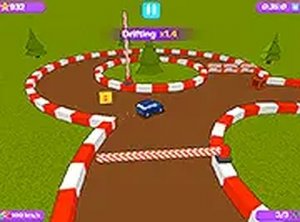
Mini Speedway 3D Dash succeeds by focusing on one core action: steering. The automatic forward movement removes complexity, letting players concentrate on navigating tracks and grabbing coins. The mystery box power-ups add a welcome layer of strategy without complicating the controls. Its browser-based nature means zero setup, and the colorful visuals keep the mood light. While it lacks depth for hardcore racing fans, it is an excellent pick for casual play sessions or quick breaks.
Description
Automatic Movement & Steering Focus
In Mini Speedway 3D Dash, the car propels itself forward without any accelerator input. This design choice shifts the player's attention entirely to navigation. Using keyboard arrows on a computer or tapping the screen sides on a mobile device, you guide the vehicle left or right to stay on course. A brake button is available for tighter turns or when approaching obstacles, allowing for brief slowdowns to avoid setbacks. This streamlined control scheme makes the game accessible to new players while still requiring precision and quick reactions.
Track Layout & Item Collection
Each course presents a unique arrangement of lanes, curves, and barriers. Coins are scattered along the path, and collecting them adds to your score. Mystery boxes appear at intervals, granting temporary advantages like a magnetic pull that attracts nearby coins or a multiplier that increases each coin's value. Choosing the optimal lane is key to gathering more items and avoiding slowdowns. The tracks are designed to offer variety, with different obstacle placements and coin patterns that encourage repeated play to discover the best routes.
Visual Style & Browser Accessibility
The game features bright, playful graphics with a toy-like aesthetic that suits its miniature theme. Everything runs directly in a web browser on both desktop computers and mobile devices, eliminating the need for downloads or installations. A full screen mode is available for a more immersive view. The simple visuals ensure smooth performance across a wide range of hardware, making it easy to start playing without any setup.
Progression Through Practice
Improvement comes from learning each track's layout and refining your steering technique. Regular play helps build familiarity with obstacle locations and optimal coin paths. Using the brake at the right moments on sharp curves prevents crashes and maintains momentum. Over time, reflexes sharpen, leading to faster finish times and higher scores. The game's straightforward mechanics allow players of all ages to enjoy gradual skill development without overwhelming complexity.
Compatibility
Faq
Handpicked Games

Festive Ornament Drop

Winged Woodland Glide

Quick Reflex Lab

Stacking Dolls: Timing Challenge
Recall Pairs: Brain Training

Stellar Drift: Classic Space Shooter

Skating Chef Delivery Quest

Shiny Square Sort

Tap the Fruit: Endurance Clicker

Player Comments
Sign in to comment
You must be logged in before posting a review or rating.
No account? Create one
No comments yet. Be the first to comment!